Se afișează postările cu eticheta Gadget. Afișați toate postările

sâmbătă, 31 martie 2012

Prestigio MultiPad PMP5080B Tablet - Review

The Android tablet market can be divided into two general groups: devices from established manufacturers who offer premium products at a premium price, and devices from obscure companies that seem to offer amazing hardware and software for an impossibly low price. Sadly, the latter products offer very little in terms of user experience and are essentially low spec hardware with an unofficial and incompatible Android ROM flashed to the internal storage.

Prestigio_MultiPad_PMP5080B_Front Prestigio_MultiPad_PMP5080B_back

The Prestigio MultiPad PMP5080B fits nicely between these two extremes. It’s not a high end Android tablet but neither is it a half hearted attempt to cash in on the Android brand. Costing around 199 Euros, it’s at the cheaper end of the market (cheaper, not cheap – there’s a big difference). It’s an 8-inch device running Android 2.3 Gingerbread so initially things sound good.

Read the full review after the break >>

First Impressions

Open up the box and you’re presented with the tablet tucked into its black leather-effect sleeve, with the four standard capacitive hardware buttons visible along the open end. The case is lined with red felt and should keep the hardware well protected.

Removing the tablet from the case and first impressions are good – the edges and rear panel are black plastic with subtle profiling. The shape of the sides allows the user to maintain a firm grip with one-handed use, although the 8-inch 4:3 aspect ratio TFT screen means that the MultiPad is nearly 6-inches wide nearly 8 inches high, so it may be more suited to users with larger hands unlike taller tablets with a slimmer 16:9 aspect ratio. The MultiPad weighs in at a tad over 0.5kg so it’s not the lightest tablet around, but it feels solid and the 5400mAh battery is an acceptable justification for the weight.

Also in the box is a wall changer, USB cable for connecting the tablet to a PC, warranty card and a very basic user guide.

The Screen

Booting up the MultiPad takes around 40 seconds and the first thing you’ll notice is the screen resolution. While the capacitive 8-inch TFT screen is clearly larger than the latest ‘large screen’ smartphones, the resolution is only 800×600 which is similar to many smartphones with half the screen size. The homescreen icons and widgets look good with plenty of colour and contrast, although the relatively low resolution gives them a slightly blocky appearance around the edges under close inspection. You can see them clearly enough and know exactly what they are, but they’re not presented as well as more expensive tablets with a higher pixel count. Text presentation on web pages or your Twitter feed is clear and easy to read in most situations but can appear to be a little rough around the edges due to the resolution, although the text would need to be very small before it becomes unreadable. This is certainly something you could live with if you take into account the reasonable asking price; it’s understandable that certain compromises need to be made. If the MultiPad had a higher resolution, it would have a corresponding higher price.


The Hardware

Holding the MultiPad in landscape view with the capacitive hardware buttons along the right of the screen, the physical power and volume rocker control buttons are on the left side edge. On the right side edge you’ll find the 5v DC power input, 3.5mm headphones socket, mini USB connector and HDMI output. The capacitive control buttons – Back, Menu, Home and Search – will be familiar to most users. The order that these buttons have been placed makes them more intuitive to use in landscape mode – in portrait view the Home and Back buttons are opposite to how most smartphone users will be used to, but it doesn’t take long to remember the layout. On the rear cover you’ll find a pair of speakers and the cover for the micro SD card.

The MultiPad has a 2MP front facing camera that can be used as a webcam for video calls.

In portrait view, it’s possible to hold the MultiPad in one hand and use the other hand to interact with the screen. The tablet feels nice in the hand and the edges that slope inwards towards the front panel are ideal for maintaining a firm grip.

Performance

Swiping through the five homescreens is fairly smooth with no noticeable lag. Apps and folders open up quickly when selected. Overall performance is good although things seemed to slow down slightly when multi-tasking due to the single core processor. More RAM memory and a dual core processor would avoid this lag and would increase performance, but it would also increase the price. When you remember that this is a budget device at a reasonable price, it’s probably something that the majority of users will be happy to live with.

There are no such problems with web browsing. Pages load quickly over Wi-Fi and the fact that the screen is fairly large means there’s rarely a need to zoom in using the multi-touch pinch.

Video playback on the tablet is quite good, although the 800×600 screen can’t really show high definition video in all it’s glory. However, hook up the tablet to a high definition display using the HDMI output and 1080p full HD playback is possible at 26 mbit/s.

One feature that Prestigio is proud of is their eBook capabilities. The MultiPad comes with their eBook reader and library pre-installed and users have access to the PrestigioPlaza eBook store with around 80,000 titles to choose from.

Android UI

The MultiPad comes preloaded with Android 2.3.1 Gingerbread which is nice to see – many tablets in this price range are running Android 2.2 FroYo and are unlikely to receive any kind of official updates. Still, it would have been better to see a Honeycomb OS, which is designed to be more tablet orientated. The main system apps and menu settings will be familiar to anyone who has used an Android device, and anyone new to Android will soon feel at home thanks to the intuitive interface.

The user interface (UI) that sits between the Android operating system and the user is fairly clean with only minimal changes by Prestigio, such as a custom icon set for the pre-installed apps.

Modifying the homescreens is a simple process, just like other Android devices. Shortcuts and widgets can be added to any of the five homescreens with a long press on any empty space. Access to the Android Market is easy to set up using your Google account details when you first open the Market app, so you’re never far away from the apps and widgets you need.

Most of the icons on the standard homescreens are actually shortcuts to folders that contain a number of app shortcuts. Tapping the icon instantly opens a folder window at the bottom of the screen containing apps grouped by genre, such as Communications (Skype, Facebook, Twitter).

Verdict

The Prestigio MultiPad PMP5080B is a fine example of an entry-level Android tablet. The user interface on the Gingerbread OS works exactly as you would expect and there are no complicated manufacturer modifications to confuse the user. The tablet feels nice to hold and responds well to touch input.

There are some obvious shortcomings which are hard to avoid on a budget tablet where cost is important. The lack of 3G means that mobile data is limited to Wi-Fi hotspots, and the single core processor with relatively low RAM memory means that performance can feel restricted at times. And of course the screen resolution is not quite what you would expect from an 8-inch TFT display.

However, the features that are included have been implemented fairly well and Prestigio seem to have achieved the reduced retail price by making the most out of the included features, rather than settling for sub-standard features that would spoil the overall user experience. During the testing for this review, the MultiPad was used for all the usual tasks including internet browsing, email, and social networking within reach of a Wi-Fi router, and it did everything that was asked of it without any problems. As an internet-enabled tablet that will be used mainly where Wi-Fi is available, the MultiPad is nice device at a budget price. (Sursa)

miercuri, 7 martie 2012

WoodBox Radio - FX Pad


FXpad is a special edition of CAT software for the famous Tmate. Full control of your Software Defined Radio, as PowerSDR (TM), on a USB touchsreen desktop minimonitor and CAT software that, besides controlling the USB knob Tmate , creates a nice and confortable desktop virtual radio front panel with buttons and display as a real radio.

HAMpad is the most advanced accessories available in amateur Software Defined Radio market today: a touchscrenn USB minimonitor.
CAT control of FlexRadio Systems transceivers *

FXpad is a software, running on your PC, displays on a special Touchscreen minimonitor USB, direct supports Tmate USB console and CAT serial protocol.

HAMpad with FXpad and Tmate are the best combination for full desktop control of the Fleradio Suystems transceivers performed by PowerSDR (TM) (it must be active and CAT configured)

Many functions of PowerSDR are supported:
S-meter, Power out, SWR, ALC in realtime analog like meters, frequency readout, bands, filters, DSP, tune, a pratical numeric keyboard for direct frequency enter ad Macro CAT commands.

FXpad, with its handy touchscreen, makes available buttons with a functional GUI while Tmate makes available 4 multifunction real buttons and the tuning knob. (see below)

Using CAT and a pair of Virtual Serial Ports (we suggest VSPE by Eterlogic) you can control PowerSDR (TM) in many functions.

* Not tested with SDR-1000
* Some functions are not available for FLEX-1500 Sursa: http://www.woodboxradio.com/uk/FXpad.html

vineri, 16 decembrie 2011

MBL Radialstrahler – revoluția sunetului sferic

În limba germană, Radialstrahler înseamnă “a emite un semnal circular”, iar acesta este principiul după care sunt construite difuzoarele companiei germane. Tehnologia nu folosește difuzoare convenționale, în care vibrațiile unei membrane sunt amplificate în interiorul unei incinte acustice, ci un sistem ovoidal format din mai multe lamele care pulsează.

Lamelele din care este construit fiecare ovoid sunt confecționate din fibră de carbon sau un aliaj de magneziu și aluminiu, în funcție de proprietățile acustice ale fiecărui material și a aplicabilității lui pe o anumită frecvență.

Datorită formei sale, acest tip de difuzor oferă o proiecție acustică spațială excepțională, fiind greu de egalat de difuzoarele clasice. Primele încercări de a crea un difuzor pe această tehnologie au avut loc la începutul anilor ’80, când inginerul Wolfgang Meletzky a realizat primul prototip Radialstrahler, format din trei difuzoare ovoidale, fiecare pentru câte un segment al spectrului audio: sunete joase, medii și înalte. Pentru a varia sunetul obținut, fiecare dintre cele trei ovoide avea o dimensiune diferită: cea dedicată sunetelor înalte era de dimensiunea unei mingi de ping-pong, cea pentru sunete medii de dimensiunea unei mingi de fotbal, iar cea pentru bass avea un diametru de câteva zeci de centimetri.

Actualul vârf de gamă, numit MBL Radialshtrahler 101 X-treme, impresionează în primul rând prin dimensiunile foarte mari: 186 de centimetri înălțime și 265 kg greutate. Fiecare exemplar al modelului 101 X este compus din două corpuri separate: unul pentru sunete medii și înalte și unul dedicat exclusiv bass-ului, bazat pe difuzoare convenționale. Greutatea totală a unui astfel de asnamblu se apropie de jumătate de tonă, deci este foarte important ca ele să fie poziționate pe suprafețe rezistente și stabile. Designul se axează pe forma unică a difuzoarelor, acestea fiind complet expuse, fiind protejate doar de o cortină de filamente negre.

Compania germană produce și o serie de amplificatoare, preamplificatoare și CD-playere, care completează difuzoarele Radialstrahler și oferă un nivel optim al performanței acestora. Mai multe detalii pe mbl.de.

Sursa: http://www.stylereport.ro/hi-tech/mbl-radialstrahler-revolutia-sunetului-sferic

luni, 4 aprilie 2011

Kindle 3G Wireless Reading Device

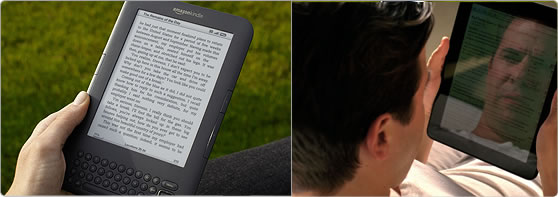
  • Ebook Readerul Amazon Kindle nu mai are nevoie de introducere: este dispozitivul care a revolutionat piata de carte electronica, devenind inca de la prima generatie standardul dupa care celelalte produse din categorie sunt judecate. Amazon Kindle este considerat cel mai bun eBook Reader din lume, iar a treia generatie duce inovatia si mai departe:


    Kindle-hand

    • Ecran nou E Ink – contrast cu 50% mai bun gratie tehnologiei E Ink Pearl;
    • Browser WEB – navigheaza pe internet gratis prin conexiunea 3G oriunde te-ai afla;
    • Redare fisiere mp3 - poti asculta carti audio sau muzica in timp ce citesti;
    • Citeste chiar si in lumina directa a soarelui, fara reflexii;
    • Fonturi noi imbuntatite, mai clare si mai inchise la culoare;
    • Design nou mai compact – carcasa cu 21% mai mica decat generatia anterioara;
    • Incredibil de usor: cu 17% mai usor, la doar 241 grame noul Kindle cantareste mai putin decat o carte clasica;
    • Design mai ergonomic: Kindle este usor de tinut intr-o singura mana si a fost proiectat pentru sesiuni indelungate de lectura;
    • Baterie cu autonomie de pana la o luna;
    • Spatiu dublu de stocare de 4 Gb, pentru pana la 3500 carti;
    • Cu 20% intoarcere rapida a paginilor – pentru o experienta desavarsita a lecturii;
    • Cititor PDF imbunatatit;

    Ebook Readerul Amazon Kindle iti da acces la cele peste 775.000 de titluri din Kindle Store, incluzand ultimele bestsellere, peste 1000 de carti gratuite si editiile celor mai importante ziare. Achizitia se poate face direct de pe dispozitiv iar volumele sunt livrate wireless in mai putin de 60 de secunde.

    Cu Amazon Kindle poti citi peste 2,5 milioane de carti gratuite disponibile pe internet:

    Noul ecran E Ink Pearl
    Ecranele e-ink nu obosesc ochii intrucat folosesc cerneala electronica. Deseori, ecranul este confundat cu hartia tiparita de persoanele care vad un display de acest gen pentru prima data.

    Nu oboseste ochii: se citeste exact ca o carte tiparita, nu precum un ecran de PC. Ecranul e-ink al noului Kindle este ideal pentru lectura intrucat nu creeaza aceeasi oboseala pentru ochi precum cea indusa de ecranele LCD sau LED ale tabletelor sau computerelor.

    Text mai clar si mai detaliat: tehnologia e-ink foloseste cerneala electronica pentru a afisa un text similar celui intalnit intr-o carte tiparita. Fonturile Kindle beneficiaza de caracteristicile tehnologiei e-ink pentru a reda litere clare si precise.

    Nicio reflexie, chiar si in lumina puternica a soarelui: ecranul eReaderului Amazon Kindle se comporta precum hartia obisnuita, eliminand reflexiile intalnite in cazul ecranelor retroiluminate ale tabletelor sau telefoanelor mobile. Kindle poate fi folosit pentru citit atat in aer liber, in lumina soarelui, cat si in interior.

    kINDLE-SUNLIGHT

    Text redimensionabil: Amazon Kindle iti permite sa maresti sau sa micsorezi corpul literei in 8 dimensiuni, in functie de preferintele tale. Poti de asemenea schimba spatierea dintre randuri, distanta textului fata de margine sau orientarea paginii. Cu Amazon Kindle cartile arata cum vrei tu!

    Kindel-font-size

    Usor de folosit: Amazon Kindle este usor de folosit si nu necesita un computer. Inca din momentul primei porniri poti citi cartile preferate fara a fi necesare setari sau instalari de software aditional.


    Design ergonomic: Kindle este usor de tinut in mana chiar si pentru sesiuni indelungate de lectura. De fapt, Kindle a fost conceput pentru cititul de durata, butoanele pentru intoarcerea paginilor fiind plasate pe ambele parti, permitand schimbarea paginii din orice pozitie. Carcasa neagra cu finisaj moale este placuta la atingere, usor de tinut intr-o singura mana si nu emana niciun fel de caldura.

    Intreaga biblioteca in doar 241 de grame: Kindle este partenerul ideal pentru calatorii, cantareste numai 241 de grame si poate stoca pana la 3500 de carti. Nu mai trebuie sa alegi cartile in functie de dimensiune: cu Amazon Kindle poti lua intreaga biblioteca cu tine!

    Kindle-vraf-carti

    Asculta muzica preferata: transfera melodiile tale MP3 pe Kindle si asculta muzica in timp ce citesti. Poti transfera usor si rapid melodiile preferate prin simpla conectare eReaderului la calculator prin cablul USB inclus.

    Pregatit pentru audiobooks: cartile audio in format mp3 se transfera la fel de usor si pot fi ascultate fie la casti, fie folosind difuzorul integrat Kindle.

    O comunitate globala de cititori: impartaseste-ti pasiunea pentru carti si citit cu prietenii, familia si ceilalti cititori de pe mapamond prin postarea pasajelor preferate din carti pe site-uri de socializare precum Facebook si Twitter – direct de pe Kindle si fara a parasi pagina.


  • Kindle-PDFAlte caracteristici

    • Acces gratuit la reteaua Whispersync (sincronizarea paginii, a semnelor de carte si notitelor de lectura pentru volumele achizitionate din Kindle Store)
    • Text-to-Speech - redarea audio a textelor in limba engleza
    • PDF Reader
    • Redare audio (muzica si audiobooks)
    • Browser pentru navigarea pe internet

    Pachetul include:

    • Kindle Wireless 6 inch eBook Reader (WiFi + 3G gratuit)
    • cablu USB pentru conectarea la computer
    • manual de utilizare in limbile romana si engleza
    • certificat de garantie. Sursa:

sâmbătă, 19 martie 2011

HTC Desire

HTC Desire este un smartphone de care multi posesori sunt multumiti si inca poate fi numit un telefon de actualitate avand in vedere ca a fost lansat prin luna martie a anului 2010.

Inainte de a discuta activ despre acest telefon, am sa va trec in revista caracteristicile principale: ecarn tactil AMOLED de 16M, Multi-touch, 576 MB RAM, 512 MB ROM, suport pentru card de memorie microSD cu capacitate de stocare de pana la 32 GB si un card microSD de 4GB inclus in pachetul de vanzare, HSDPA, HSUPA, Wi-Fi, camera foto de 5MP cu led flash, sistem de operare Android 2.1,procesor 1GHz, acumulator de 1400 mAh si A-GPS. Cu siguranta ne putem duce in detaliu pe fiecare dintre caracteristicile principale si o putem face daca ne veti solicita acest lucru.

Pot spune ca am fost si eu posesorului unui HTC Desire pentru o perioada insemnata de timp si experienta de utilizare a fost extraordinara. Unele modele vin cu versiunea Android 2.1 instalata, dar se poate face update usor direct de pe telefon la versiunea Android 2.2 (Froyo), iar alte modele de HTC Desire vin direct cu sistemul de operare Android 2.2 (Froyo).

" src="http://gsmro.ro/wp-content/uploads/2011/02/HTC-Desire-in-mana-300x284.jpg" alt="HTC Desire in mana 300x284 HTC Desire" width="300" height="284">Update-ul la Android 2.2 (Froyo) aduce imbunatatiri semnificative si putem mentiona una importanta pentru amatorii de filmulete: transforma telefonul intr-o camera de filmat HD icon smile HTC Desire . Interfata cu utilizatorul prin intermediul ecranului tactil este una foarte prietenoasa si raspunsul la comenzi este foarte rapid. Deasemeni, pot evidentia si faptul ca sunt foarte multe aplicatii gratuite pentru sistemul de operare Android care functioneaza cu succes!


E-mail-ul functioneaza extraordinar pe acest telefon si poate fi configurat extrem de usor. Contectarea la o retea Wi-Fi de internet puternica va transforma HTC Desire-ul icon smile HTC Desire intr-un mic computer portabil cu care puteti naviga foarte usor pe internet.

Am testat si functia GPS pe acest telefon, dar nu cu suport Google ci cu o aplicatie numita Motonav. Aplicatia functiona foarte bine, iar hartile erau chiar actualizate – l-am testat in Galati, Iasi si bineinteles localitatile dintre cele doua orase mentionate. Cu siguranta Teo va scrie un tutorial despre instalarea acestei aplicatii, el fiind inca posesorul unui astfel de smartphone.

Nu pot spune lucruri foarte bune despre autonomia acumulatorului, pentru ca aceasta este una destul de mica. Pot spune ca in conditii de folosire normale, acesta ma “tinea” undeva la vreo 2 zile. Daca foloseam telefonul intensiv uneori nu apucam nici 24 de ore. Autonomia scazuta a acumulatoarelor smartphone-urilor este un criteriu de care toti posesorii ar trebui sa fie constienti si sa nu-si faca asteptari false.

Concluzia mea esta ca HTC Desire chiar este unul dintre smartphone-urile care isi merita banii pe deplin. http://gsmro.ro/2011/02/htc-desire/